ClickHouse and Friends (4) Pipeline Processors and Scheduler
Last updated: 2020-08-15
This article discusses ClickHouse’s core technology: Processor and DAG Scheduler.
These concepts weren’t pioneered by ClickHouse. Interested folks can check out materialize‘s timely-dataflow. I also wrote a golang prototype.
It’s all about implementation details. It’s precisely these modules’ excellent design that gives ClickHouse its overall high performance.
Pipeline Problem
In traditional database systems, a Query processing flow is roughly:
In the Plan phase, a Pipeline assembly is often added (one transformer represents one data processing):

All transformers are orchestrated into a pipeline, then handed to the executor for serial execution. Each transformer execution processes and outputs the dataset until it reaches the downstream sinker.
You can see this model’s advantage is simplicity, and its disadvantage is low performance. It can’t leverage CPU parallelism — commonly called the volcano-style model. For OLTP low latency, it’s sufficient. For compute-intensive OLAP, it’s far from enough. CPU not at 100% is a crime!
For the above example, if transformer1 and transformer2 have no intersection, they can process in parallel:
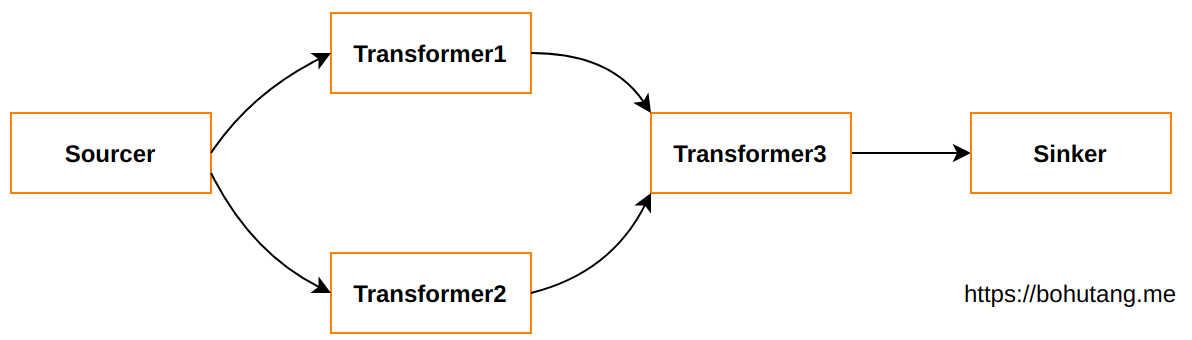
This involves some soul-searching questions:
- How to achieve flexible orchestration of transformers?
- How to achieve data synchronization between transformers?
- How to achieve parallel scheduling between transformers?
Processor and DAG Scheduler
1. Transformer Orchestration
ClickHouse implements a series of basic transformer modules, see src/Processors/Transforms, for example:
- FilterTransform – WHERE condition filtering
- SortingTransform – ORDER BY sorting
- LimitByTransform – LIMIT trimming
When we execute:
1 | SELECT * FROM t1 WHERE id=1 ORDER BY time DESC LIMIT 10 |
For ClickHouse’s QueryPipeline, it orchestrates and assembles like this:
1 | QueryPipeline::addSimpleTransform(Source) |
This achieves transformer orchestration. But how does data synchronize during execution?
2. Transformer Data Synchronization
When QueryPipeline orchestrates transformers, we also need to build lower-level DAG connectivity.
1 | connect(Source.OutPort, FilterTransform.InPort) |
This establishes data flow relationships. One transformer’s OutPort connects to another’s InPort, just like real-world plumbing pipes. Interfaces can have 3-way or even multi-way connections.
3. Transformer Execution Scheduling
Now the pipeline is assembled. But how does the water inside the pipes get processed and pressurized to flow?
ClickHouse defines a set of transform states. The processor schedules based on these states.
1 | enum class Status |
When source generates data, its status is set to PortFull, meaning it’s waiting to flow into other transformers’ InPort. The processor starts scheduling FilterTransformer’s (NeedData) Prepare to PullData, then its status is set to Ready, waiting for the processor to schedule the Work method to perform data Filter processing. Everyone relies on states to let the processor sense, schedule, and do state transitions until the Finished state.
Worth mentioning is the ExpandPipeline state. Based on transformer implementation, it can split one transformer into more transformers executing in parallel, achieving an explosion effect.
Example
1 | SELECT number + 1 FROM t1; |
For a deeper understanding of ClickHouse’s processor and scheduler mechanism, let’s have a native example:
- A Source:{0,1,2,3,4}
- AdderTransformer performs add-1 operation on each number
- A Sinker, outputs results
1. Source
1 | class MySource : public ISource |
2. MyAddTransform
1 | class MyAddTransformer : public IProcessor |
3. MySink
1 | class MySink : public ISink |
4. DAG Scheduler
1 | int main(int, char **) |
Summary
From a developer’s perspective, it’s still quite complex. State transitions need developer control. However, upstream has done a lot of foundational work, such as the ISource wrapper for sources, ISink wrapper for sinks, and a basic ISimpleTransform, making it easier for developers to use processors at higher levels. They can build the pipeline they want like building blocks.
ClickHouse’s transformer data unit is Chunk. Transformers process Chunks flowing from upstream OutPort, then output to downstream InPort. Graph-connected pipeline parallel work keeps the CPU as fully loaded as possible.
When a SQL is parsed into AST, ClickHouse builds a Query Plan based on the AST, then builds a pipeline based on QueryPlan, and finally the processor is responsible for scheduling and execution.
Currently, ClickHouse’s new version has QueryPipeline enabled by default, and this code is continuously iterating.
