ClickHouse and Friends (6) MergeTree Storage Structure
Last updated: 2020-09-28
The previous post Storage Engine Technology Evolution and MergeTree introduced the evolution of storage algorithms.
The storage engine is a database’s chassis — it must be stable and powerful.
Next, we’ll explore ClickHouse MergeTree columnar storage engine together, deconstructing the most important components of this “sports car.”
All storage engines, whether excellent or shoddy, ultimately write data back to disk to meet storage and indexing purposes.
Disk file construction can be said to be the physical embodiment of algorithms. We can even reverse-engineer algorithm implementation from these storage structures.
So, to deeply understand a storage engine, the best starting point is its disk storage structure. Then reflecting on its read/write mechanisms will feel natural.
If you reverse this analysis order, it feels forced. Most online tutorials use this “forced” teaching method. This article will strike at the soul from the bottom layer, thoroughly clarifying 4 questions:
What files does MergeTree have?
How is MergeTree data distributed?
How is MergeTree index organized?
How does MergeTree use indexes to accelerate?
Without further ado, here’s the table:
1 | CREATE TABLE default.mt |
Generate some data:
1 | insert into default.mt(a,b,c) values(1,1,1); |
Disk Files
1 | ls ckdatas/data/default/mt/ |
You can see 3 data directories were generated. Each directory is called a partition (part) in ClickHouse. The directory name prefix is exactly the value of field a when we wrote: 1, 3, 5, because the table partition is positioned like this: PARTITION BY a.
Now let’s look at the a=3 partition:
1 | ls ckdatas/data/default/mt/3_6_6_0/ |
- *.bin are column data files, sorted by primary key (ORDER BY), here sorted by field b
- *.mrk2 mark files, purpose is to quickly locate bin file data positions
- minmax_a.idx partition key min-max index file, purpose is to accelerate partition key a lookup
- primary.idx primary key index file, purpose is to accelerate primary key b lookup
- skp_idx_idx_c.* field c index file, purpose is to accelerate c lookup
On disk, MergeTree has only one physical sort: the ORDER BY primary key order. Other files (like .mrk/.idx) are logical acceleration. Around this single physical sort, the problem to solve is:
With field b physically sorted, how to achieve fast lookup of field a and field c?
MergeTree engine is simple to summarize:
The entire dataset is divided into multiple physical partitions by the partition field. Within each partition, logical files accelerate lookup around the only physical sort.
Storage Structure
Data Files
For storage structure within a single physical partition, first understand one point: MergeTree data has only one copy: *.bin.
a.bin is field a data, b.bin is field b data, c.bin is field c data — the columnar storage everyone’s familiar with.
Each bin file is sort-aligned with b.bin (b is the sort key), as shown:
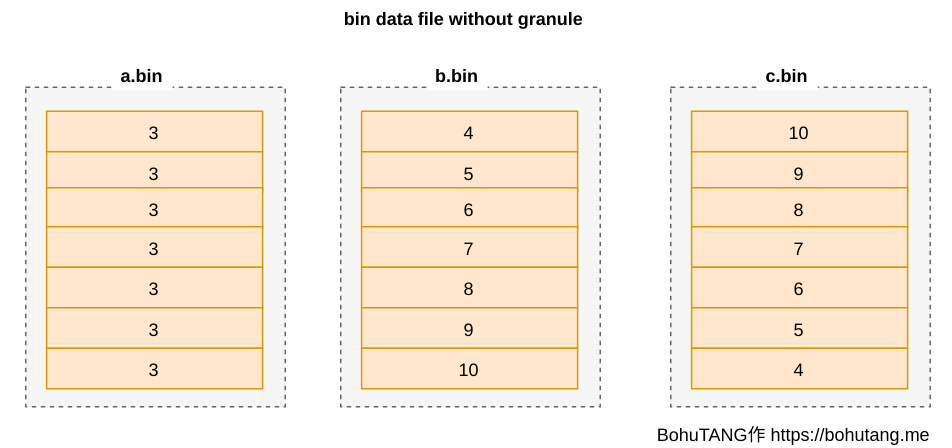
This has a serious problem:
If *.bin files are large, even reading one row of data requires loading the entire bin file, wasting massive I/O. Unbearable.
granule
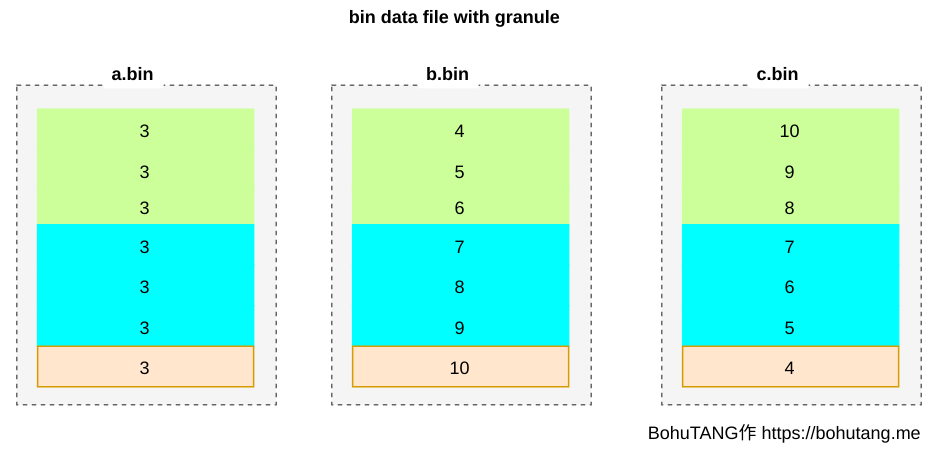
High tech arrives! ClickHouse MergeTree divides bin files into multiple granules based on granularity (GRANULARITY). Each granule is compressed and stored separately.
SETTINGS index_granularity=3 means every 3 rows of data form one granule. The partition currently has only 7 rows, so it’s divided into 3 granules (three color blocks):
For easy reading of a granule, *.mrk files record each granule’s offset. Each granule’s header records some metadata for reading and parsing:
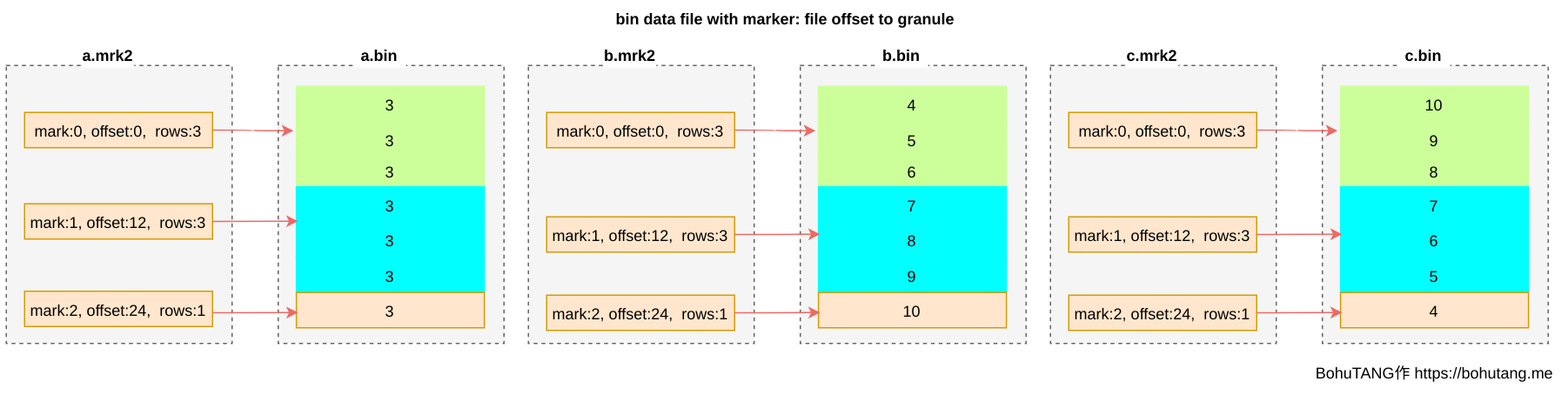
This way, we can directly locate the desired granule based on the mark file, then read and verify this individual granule.
Currently, we still lack a mapping: the correspondence between each mark and field values. Which value ranges fall in mark0, which fall in mark1…?
With this mapping, we can achieve minimized granule reading to accelerate queries:
- Determine which marks are needed based on query conditions
- Read corresponding granules based on marks
Storage Sorting
Before understanding MergeTree’s indexing mechanism, you need to understand two points:
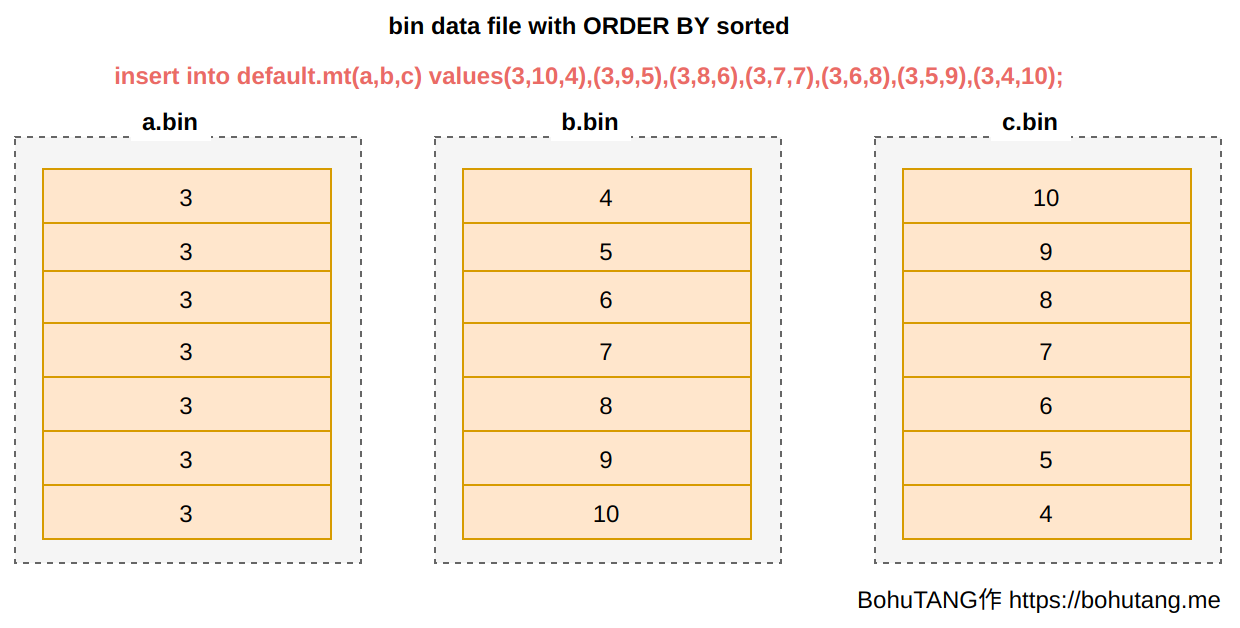
There’s only one complete data copy, stored in *.bin files
*.bin is stored in descending order by ORDER BY field
Sparse Index
Because there’s only one data copy and only one physical sort, MergeTree chose a simple, efficient sparse index mode in index design.
What is a sparse index? It’s selecting some points at intervals from already sorted complete data and recording which mark these points belong to.
1. primary index
Primary key index, can be specified via [PRIMARY KEY expr], defaults to ORDER BY field value.
Note: ClickHouse primary index is not the same concept as MySQL primary key.
For sparse point selection, take each granule’s minimum value:

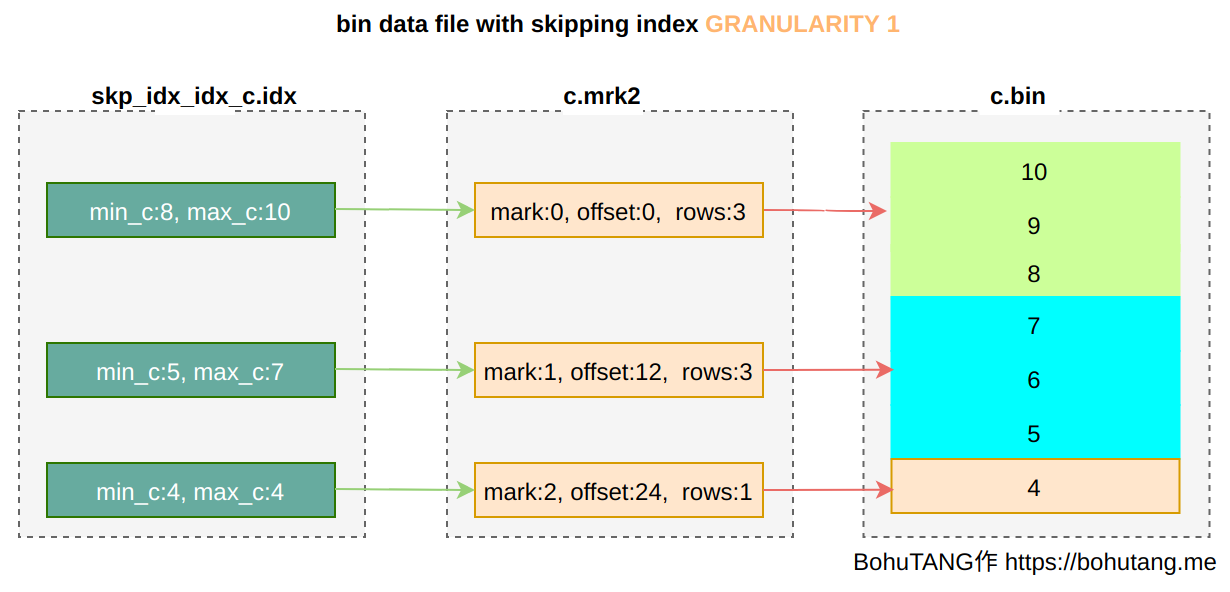
2. skipping index
Regular index.
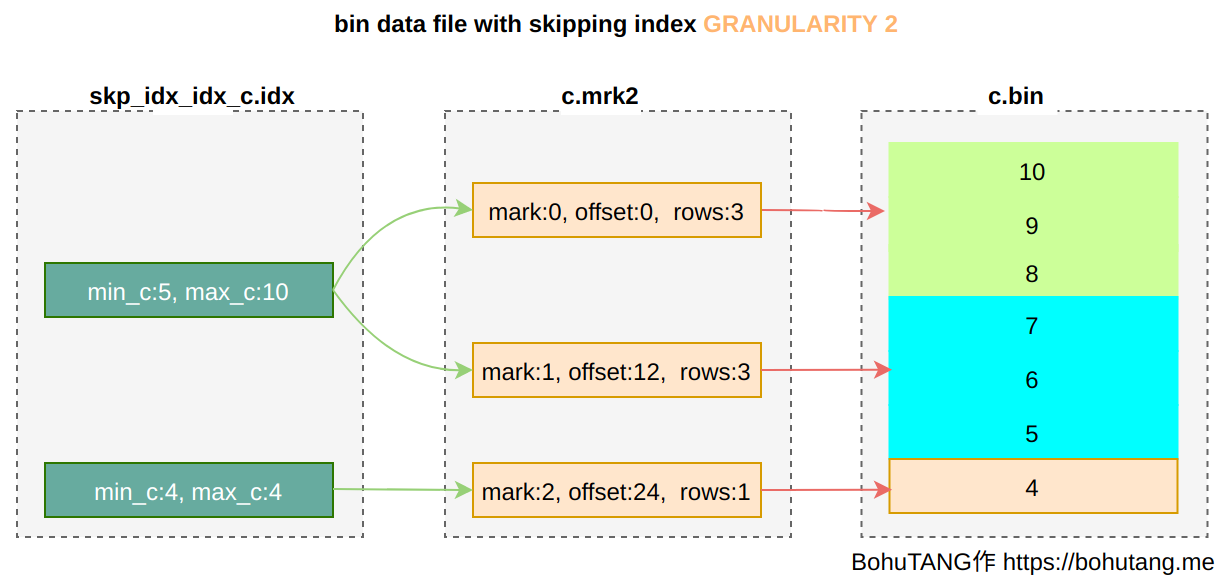
INDEXidx_c(c) TYPE minmax GRANULARITY 1 creates a minmax mode index for field c.
GRANULARITY is the granule granularity for sparse point selection. GRANULARITY 1 means select one per 1 granule:
If defined as GRANULARITY 2, then select one per 2 granules:
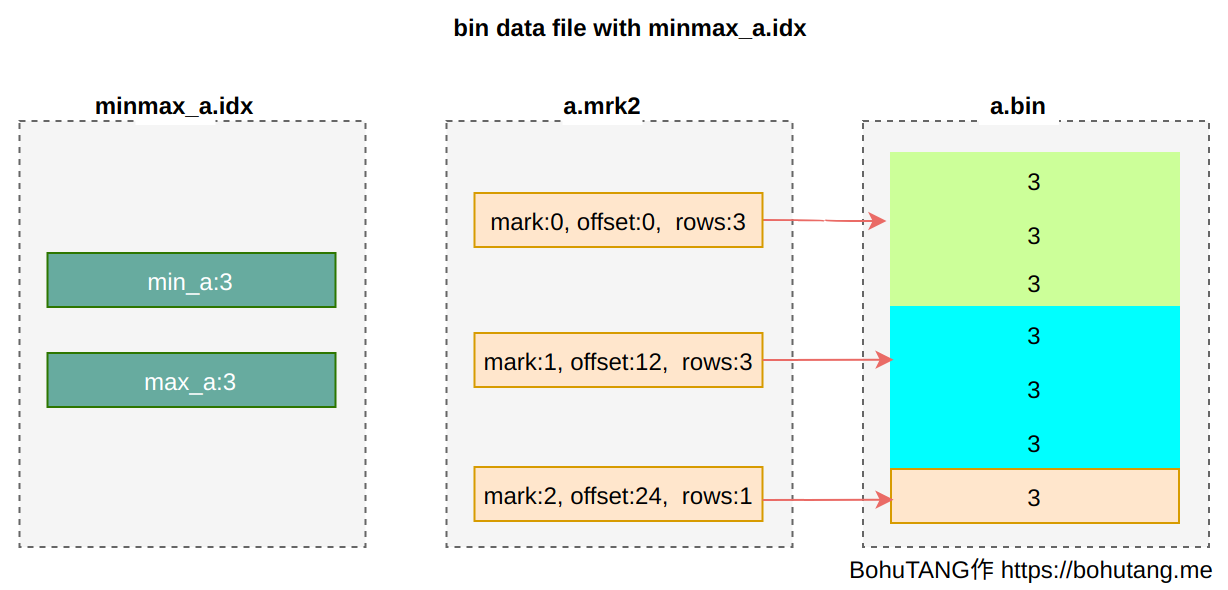
3. partition minmax index
For partition keys, MergeTree also creates a min/max index to accelerate partition selection.
4. Panoramic View

Query Optimization
Now familiar with MergeTree’s storage structure, let’s experience it through a few queries.
1. Partition Key Query
Statement:
1 | select * from default.mt where a=3 |
The query directly locates a single partition based on a=3:
1 | <Debug> InterpreterSelectQuery: MergeTreeWhereOptimizer: condition "a = 3" moved to PREWHERE |
2. Primary Key Index Query
Statement:
1 | select * from default.mt where b=5 |
The query first reads primary.idx from 3 partitions, then locates that only one partition meets the condition, finding the mark to read:
1 | <Debug> default.mt (SelectExecutor): Key condition: (column 0 in [5, 5]) |
3. Index Query
Statement:
1 | select * from default.mt where c=5 |
The query first reads primary.idx and skp_idx_idx_c.idx from 3 partitions for granule filtering (dropping unused ones), then locates that only one granule in partition 3_x_x_x meets the condition:
1 | <Debug> InterpreterSelectQuery: MergeTreeWhereOptimizer: condition "b = 5" moved to PREWHERE |
Summary
This article starts from disk storage structure to analyze ClickHouse MergeTree’s storage and index design.
Only by understanding these underlying mechanisms can we optimize our SQL and table structure to make execution more efficient.
ClickHouse MergeTree design is simple and efficient. The primary problem it solves is: with one physical sort, how to achieve fast lookup.
To address this problem, ClickHouse uses sparse indexes.
In the official roadmap, an interesting index direction is listed: Z-Order Indexing. The purpose is to encode multiple dimensions into one-dimensional storage. When we provide multi-dimensional conditions, we can quickly locate the spatial position of this condition point set. Currently, ClickHouse has made no progress on this index design.
